
Version Management
Version management is the systematic tracking, organizing, and controlling of changes to an object. A new version is created every time an object’s definition is first registered or later changed — so nothing is ever silently overwritten.
Why it matters
Section titled “Why it matters”| Benefit | What it gives you |
|---|---|
| Reproducibility | Results and artifacts can be reproduced from the exact version that made them. |
| Collaboration | Contributions from multiple users are managed without clobbering each other. |
| Auditability & compliance | A clear, complete history of every change and version. |
| Rollback & recovery | Revert to a stable version after a failure or an unintended edit. |
| Experiment tracking | Compare different versions to see what changed and why. |
| Continuous improvement | Track incremental changes and their impact over time. |
The version lifecycle
Section titled “The version lifecycle”Every object follows the same path: it starts as an editable Draft, is sent for Approval, and becomes a locked version. Cloning a locked version starts the next draft — and the cycle repeats.
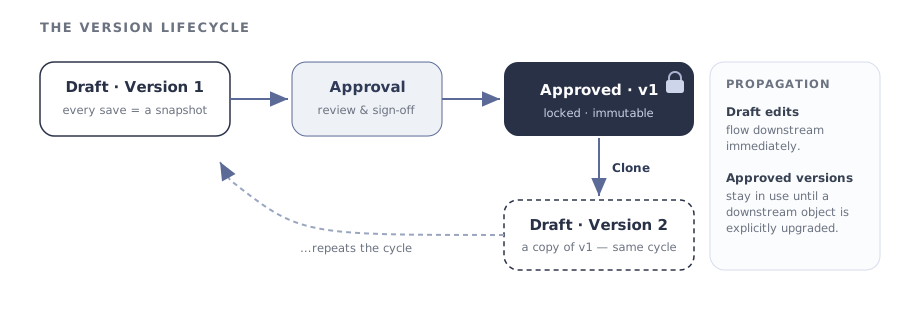
- Draft (Version 1). A Draft is created the moment an object is registered. Every modification is automatically logged to the Change History tab.
- Approval. The Draft goes through the approval workflow.
- Approved & locked. Once approved, the version is immutable — it can no longer be edited.
- Clone (Version 2). To keep working, clone the approved version into a new Draft, which goes through the same cycle of changes and approvals.
Change History — a log of snapshots
Section titled “Change History — a log of snapshots”Change History is a structured log of every modification made to an object over time. It guarantees a clear audit trail and the ability to revert to any previous state.
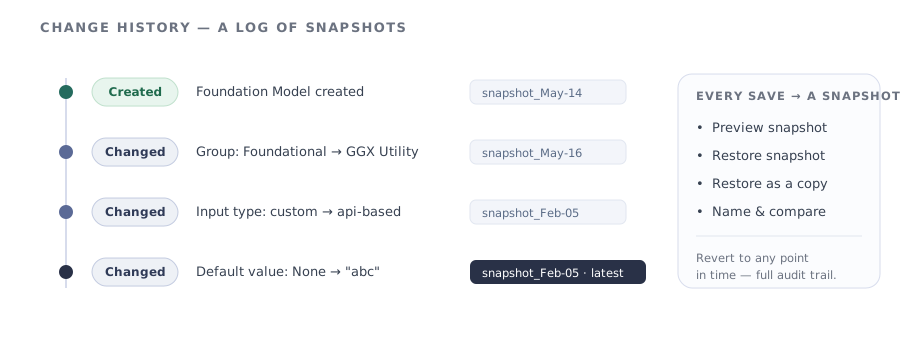
Each entry in the log is a snapshot — an exact copy of the object at the moment it was saved:
- The platform takes a snapshot every time the object is edited and saved.
- A change can be undone by restoring the snapshot from that point in time.
- Snapshots can be named, previewed, or restored as a copy.
A comprehensive change history is what makes responsible AI governance possible — it:
- Enhances traceability — track when, why, and by whom changes were made.
- Improves accountability for responsible AI deployment and governance.
- Facilitates debugging — identify and roll back problematic updates.
- Ensures compliance with regulations such as the EU AI Act (Article 12), which mandates record-keeping for high-risk AI systems.
- Builds trust through transparency into how an object evolves.
Versioning approved items
Section titled “Versioning approved items”Once a Draft is approved it cannot be modified. To continue work, create a clone — a new version that copies the object’s Name, Alias, and Type.
Only the latest approved version can be clonedThis is deliberately different from editing a Draft: Draft changes propagate downstream instantly, whereas a new approved version is adopted downstream only when an object is explicitly updated to use it — so existing applications never shift underneath you.