

Model Registration: Gemini 2.0 Flash
This guide covers registering the Gemini 2.0 Flash model on the platform.
Gemini 2.0 Flash is Google’s language model for classification and structured output tasks.
Registration Steps
Section titled “Registration Steps”Step 1. Navigate to Model Catalog
Section titled “Step 1. Navigate to Model Catalog”Go to GenAI Studio → Model Catalog and click the Create button.
Step 2. Fill in Basic Information
Section titled “Step 2. Fill in Basic Information”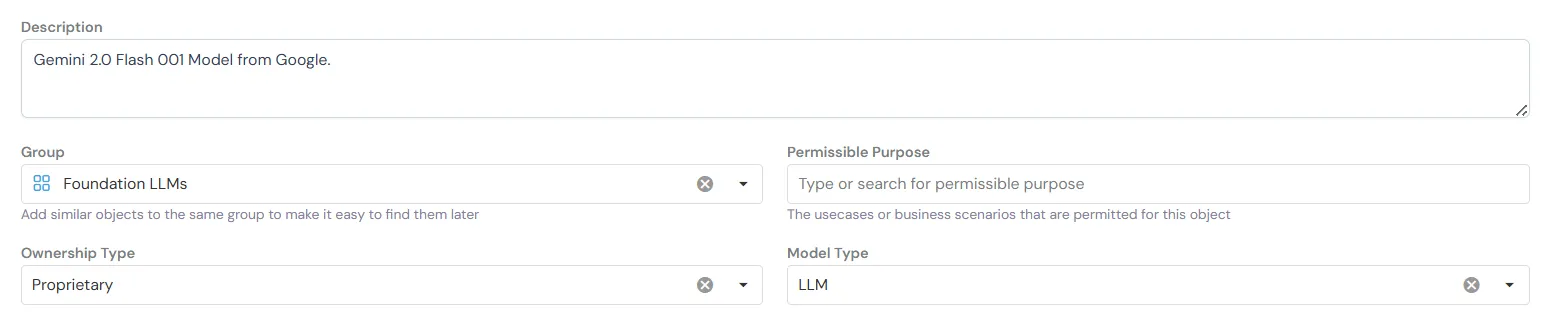
Basic Information fields help organize and identify your model:
- Name: Human-readable identifier for the model (e.g., “Gemini 2.0 Flash”)
- Description: Brief explanation of the model’s purpose and capabilities
- Group: Category for organizing similar models together (e.g., “Foundation LLMs”)
- Permissible Purpose: Approved use cases and business scenarios for this model
- Ownership Type: License type - Proprietary, Open Source, or Internal
- Model Type: Classification of the model (e.g., “LLM” for language models)
Step 3. Configure Inferencing Logic
Section titled “Step 3. Configure Inferencing Logic”Choose Input Type
Section titled “Choose Input Type”Input Type: You have two options:
-
API Based - Use this when working with models through API providers (OpenAI, Anthropic, Google Vertex AI, etc.)
-
Python Function - Use this for custom Python implementations or local models
For this guide, we’ll use API Based.
Select Model Provider
Section titled “Select Model Provider”Model Provider: Select Google Vertex AI from the dropdown
Once you select a provider, additional fields will appear to configure how the model is called:
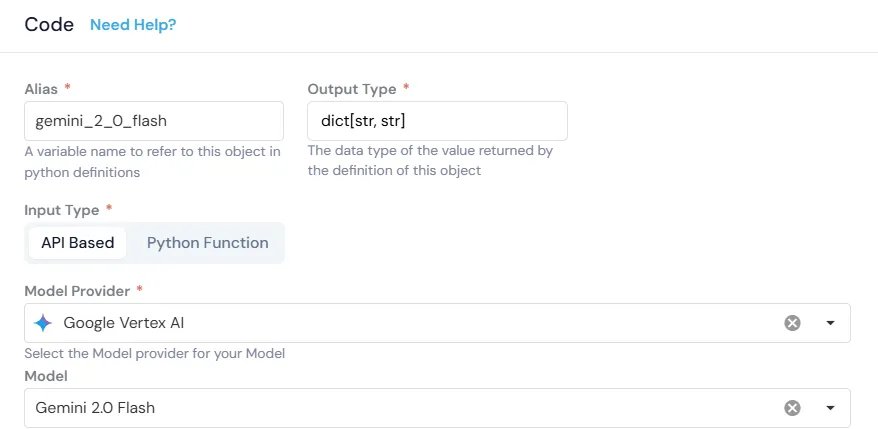
- Alias: Variable name to reference this model in pipeline code (e.g.,
gemini_2_0_flash) - Output Type: Data type returned by the model (e.g.,
dict[str, str]) - Input Type: Choose between API-based (for external providers) or Python Function (for custom code)
- Model Provider: Select the API provider hosting the model (Google Vertex AI)
- Model: Specific model version from the provider’s catalog (Gemini 2.0 Flash)
Define Arguments
Section titled “Define Arguments”The inputs to the model - messages, system instruction, temperature, etc.
Click + Add Argument to add each argument:
| Alias | Type | Is Optional | Default Value |
|---|---|---|---|
text |
String | ☐ | - |
temperature |
Numerical | ☑ | 0 |
system_instruction |
String | ☑ | None |
Argument Descriptions:
-
text: The input prompt to send to the model -
temperature: Controls randomness (0 = deterministic, 1 = creative) -
system_instruction: Optional system-level instructions for the model
You can add additional arguments based on your model’s requirements.
Write Scoring Logic
Section titled “Write Scoring Logic”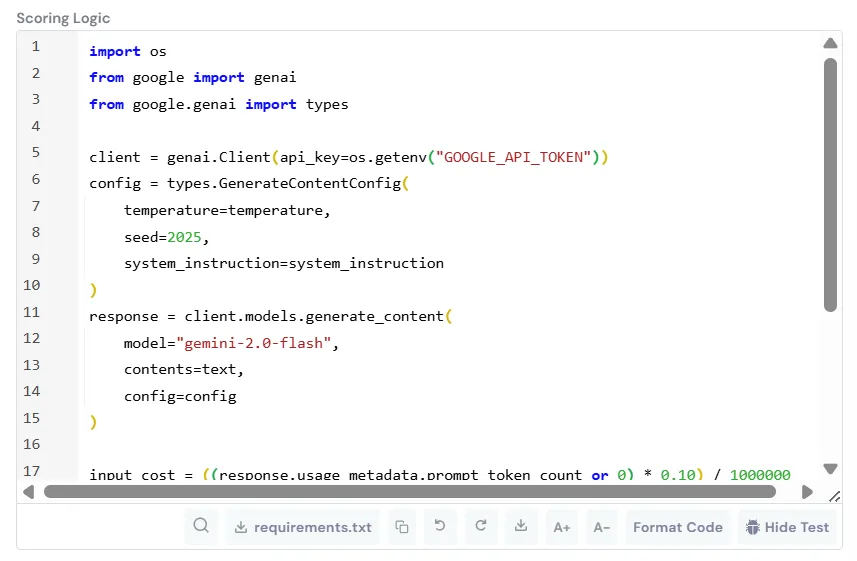
Provide logic to initialize and score the model:
import osfrom google import genaifrom google.genai import types
client = genai.Client(api_key=os.getenv("GOOGLE_API_TOKEN"))
config = types.GenerateContentConfig(    temperature=temperature,    seed=2025,    system_instruction=system_instruction)
response = client.models.generate_content(    model="gemini-2.0-flash",    contents=text,    config=config)
return {    "response": response.text,}
What This Code Does:
- Authenticates using the
GOOGLE_API_TOKENenvironment variable (configured in Platform Integrations) - Sets up generation config with temperature and system instruction
- Calls the Gemini 2.0 Flash model with the input text
- Returns the generated response
Step 4. Save the Model
Section titled “Step 4. Save the Model”Add any notes or additional information in the Additional Information section, then click Create to complete registration.
Step 5. Quick Example Run
Section titled “Step 5. Quick Example Run”Click Test Code to run a sample query.

Use the platform’s test interface to verify:
- Verify API authentication is working
- Test with sample inputs before using in production
- Debug any configuration issues
- Validate the output format matches expectations
Usage in Pipelines
Section titled “Usage in Pipelines”Once registered, the model appears in your Resources library and can be selected for any downstream usages.
Reference in pipeline code:
# Call the registered modelresponse = gemini_2_0_flash(    text=user_prompt,    temperature=0.7,    system_instruction="You are a helpful assistant.")
# Access the responseoutput_text = response["response"]
Related Documentation
Section titled “Related Documentation”- Prompt Registration Guide - Create reusable prompts
- Google Gemini API Docs - Official Google documentation