

Model Catalog
What is a model?
Section titled “What is a model?”A model is a software program that uses algorithms or rules to make informed decisions, predictions, or generations from a set of inputs without being given explicit instructions for every scenario — ML models, lookup tables, if-else rules, and LLMs all qualify.
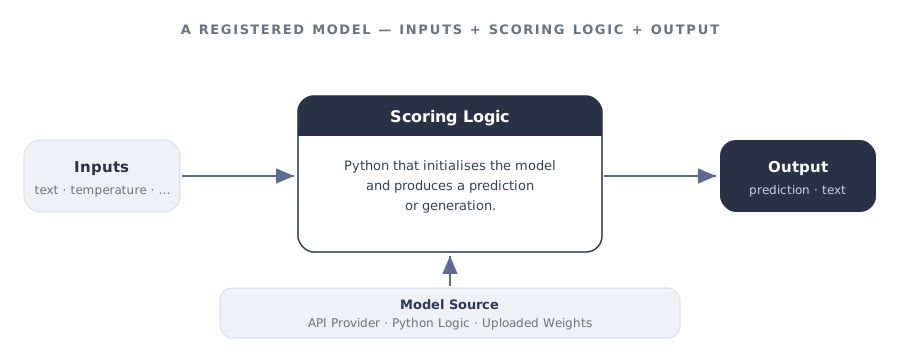
A registered model in GGX typically includes:
- Model file — stored weights, parameters, lookup tables, tensors, or other data needed to initialise the model.
- Scoring Logic — the code that takes inputs and produces a prediction or generation.
The three model types
Section titled “The three model types”Every model registered in GGX is one of three types. Choosing the right one is the first real decision you make on the registration form — it determines where the model runs and how it is configured.
External provider Best for hosted foundation models — OpenAI, Anthropic, Google Vertex AI, Azure OpenAI, AWS Bedrock, Hugging Face Inference.
- GGX calls the provider over HTTPS using your configured credentials.
- You pick the Model Provider and the specific Model from the dropdown.
- You do not upload any weights.
In-platform code Best for lightweight Python logic, rule-based models, or anything that runs inside GGX without an external file.
- Write the model’s logic directly in the Scoring Logic editor.
- Use any libraries packaged with the platform.
- No upload, no external provider.
Uploaded file Best for trained or fine-tuned models you want to host inside GGX — scikit-learn, BERT and other NLP models, custom fine-tunes.
- Upload the weights or model file.
- Write Scoring Logic that loads the file and produces a prediction.
- Runs entirely inside GGX with no external API call.
Adding a model to the catalog
Section titled “Adding a model to the catalog”The Model Catalog is the central place where every registered model lives, organised into customisable groups. From here you can track, monitor, test, and create new models.
Click Create on the Model Catalog page, then work through the form:
-
Name and description. Give the model a clear name and a description of what it does and when to use it.
-
Properties. Set the Group, Permissible Purpose, Approval Workflow, Ownership Type (Proprietary, Open Source, Internal), and Model Type (for example, LLM).
Alias. required A code-safe variable name pipelines use to refer to this model — lowercase with underscores, no spaces.
-
Input Type. Pick API-Based, Python-Based, or Custom. If API-Based, also pick the Model Provider and the specific Model.
-
Output Type. The data type the model returns, e.g.
dict[str, str]. -
Input Arguments. For each argument (typically
text,temperature,system_instruction, etc.), set its Alias, Type, whether it is optional, and a default value. -
Resources and weights. Attach any registered Global Functions or Prompts the scoring logic needs. Upload the model file under Pipeline Model File if the type is Custom.
-
Scoring Logic. Write the Python that initialises the model and produces a result. Use Test Code to validate it against sample input.
-
Save. Add notes or attach documentation under Additional Information, then click Create. The model is saved as a Draft until it goes through approval.
Supported providers
Section titled “Supported providers”API-Based models can connect to any of the following providers. Each integration page covers the credentials and configuration the provider expects.
| Provider | Use it for |
|---|---|
| OpenAI | GPT family and OpenAI-hosted models. |
| Anthropic | Claude family. |
| AWS Bedrock | Bedrock-hosted foundation models from multiple vendors. |
| Google Vertex AI | Gemini and Vertex-hosted models. |
| Azure AI | Azure-hosted OpenAI and other Azure foundation models. |
| Hugging Face | Inference endpoints for open-source models. |
Testing a model
Section titled “Testing a model”Testing a model means confirming three things: the scoring logic runs without error, it can reach its source (provider API, uploaded file, or in-platform code), and the output matches the Output Type you declared. GGX gives you two levels for this.
Quick check — Test Code in the editor
Section titled “Quick check — Test Code in the editor”Inside the Model Catalog page, the Test Code button at the bottom-right of the Scoring Logic editor runs the model against sample inputs without saving. Use it during development to:
- Confirm the API credentials configured in Integrations actually reach the provider.
- Verify the return value matches the declared Output Type (e.g.
dict[str, str]). - Sanity-check temperature, max-token, and system-instruction handling.
- Catch import errors or missing dependencies before saving.
Bulk simulation across a dataset
Section titled “Bulk simulation across a dataset”A single Test Code call tells you the model works; a Bulk Simulation tells you how it behaves across many real cases. It runs every row of a dataset through the model and produces one output per record — useful for:
- Spotting edge cases (empty input, very long input, non-English) a single test would miss.
- Measuring quality across a representative sample before promoting to production.
- Attaching the run as evidence in the model’s risk-assessment evidence tab.
A worked example: Gemini 2.0 Flash
Section titled “A worked example: Gemini 2.0 Flash”Registering Google’s Gemini 2.0 Flash as an API-Based model. The form fields:
| Field | Value |
|---|---|
| Name | Gemini 2.0 Flash |
| Alias | gemini_2_0_flash |
| Input Type | API-Based |
| Model Provider | Google Vertex AI |
| Output Type | dict[str, str] |
| Input Arguments | text (String, required) · temperature (Numerical, optional, default 0) · system_instruction (String, optional, default None) |
The scoring logic authenticates with an environment-variable token and calls Vertex AI:
import osfrom google import genaifrom google.genai import types
client = genai.Client(api_key=os.getenv("GOOGLE_API_TOKEN"))
config = types.GenerateContentConfig(    temperature=temperature,    seed=2025,    system_instruction=system_instruction,)
response = client.models.generate_content(    model="gemini-2.0-flash",    contents=text,    config=config,)
return {"response": response.text}Once saved, it can be called from any downstream pipeline:
reply = gemini_2_0_flash( text=user_prompt, temperature=0.7, system_instruction="You are a helpful assistant.",)output_text = reply["response"]Models as evaluators (LLM-as-a-judge)
Section titled “Models as evaluators (LLM-as-a-judge)”A registered model is not only the thing being tested — it can also be the thing that does the testing. An LLM-as-a-judge is simply a model whose scoring logic pairs an LLM with a Prompt to score another system’s output against criteria, returning a structured score (for example, answer relevancy on a 0–4 scale) and a reason.
Because a judge is a registered model, it is reusable across any Report and pre/post-production evaluation, and it can itself be validated: run it over a ground-truth dataset with Bulk Simulation and compare its verdicts to the known answers before you trust it. Refine its prompt — including via Prompt Optimization — to adapt a generic judge to your use case.
Capabilities unlocked by registration
Section titled “Capabilities unlocked by registration”Registering a model — rather than calling it from a one-off script — is what turns it into a governed, reusable asset:
| Capability | What you get |
|---|---|
| Change tracking | Every modification to a draft is snapshotted in Change History; approved versions are locked. |
| Purpose enforcement | Automatic detection of Permissible Purpose violations when the model is used downstream. |
| Testing & evaluation | Quick Test Code during development and Bulk Simulation across datasets before promoting. |
| Reusability | Reuse across pipelines, with visibility through Lineage Tracking. |
| API fingerprinting | External API connectivity is fingerprinted so changes upstream are detectable. |
| Auditable path to production | A transparent, fully auditable journey from Draft through Approval to use in pipelines. |
| Executable artifacts | Extract ready-to-productionise artifacts straight from the Catalog. |