

Prompt Optimization
Prompt optimization is the process of refining prompts to get more accurate responses from an LLM. The goal is to make intent as clear as possible — but conveying every detail in one attempt is hard, so it takes repeated testing and small adjustments until the model delivers what you want.
Doing that by hand — making a change, measuring its impact, and keeping a record of every experiment — is tedious and error-prone. GGX automates it with Hill Climbing experimentation.
What is Hill Climbing?
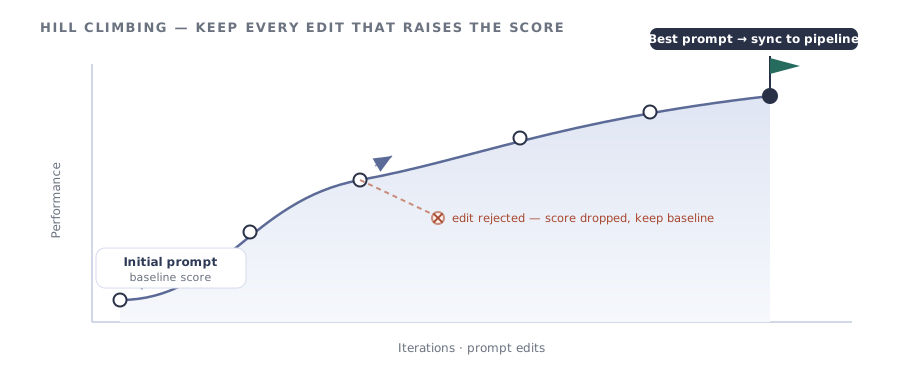
Section titled “What is Hill Climbing?”Hill Climbing is an optimization method that improves a solution gradually. It starts from an initial guess, makes small changes, and keeps any change that produces a better result — like climbing a hill by always stepping upward. It stops when no further improvement can be found.
How it works
Section titled “How it works”A run holds the evaluation fixed and changes only the prompt, so any score difference is attributable to the prompt alone.
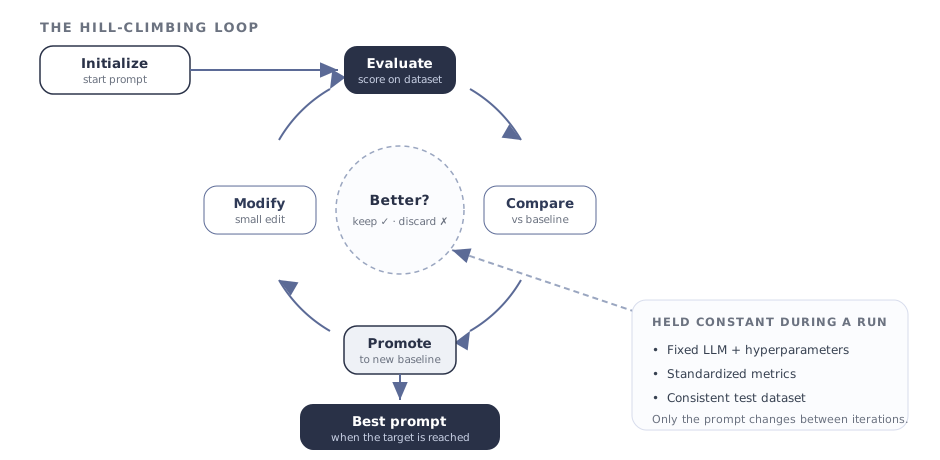
- Initialize — start with an initial prompt as the baseline.
- Evaluate — score it against fixed components: a predefined LLM with set hyperparameters, standardized metrics, and a consistent dataset.
- Modify — make a small, targeted change to the prompt.
- Compare — re-run the evaluation and measure the change in performance.
- Promote — if the new prompt scores better, it becomes the new baseline; if not, it is discarded.
- Iterate — repeat until the desired performance is reached.
What the capability gives you
Section titled “What the capability gives you”| Benefit | What you get |
|---|---|
| Full experiment log | Every prompt update and its impact on performance is recorded automatically. |
| One-click sync-back | Once the best-performing prompt is found, sync it back to the base pipeline. |
| Team collaboration | Multiple members can work on the same optimization simultaneously. |
| Custom reports | Configurable dashboards and reports track hill-climbing progress over time. |
Running a Hill-Climbing task
Section titled “Running a Hill-Climbing task”- Open the object’s Details page.
- Click Run → Hill Climbing.
- Provide a description of the run.
- Under Dashboard Selection, choose the dashboard to evaluate against.
- Make the changes to the prompts that are part of the object.
- Prepare the evaluation data under Data Sources.
- Click Run and wait for the job to complete.
- When it finishes, review the optimization progress in the Dashboards.