

RAGs
What is a RAG?
Section titled “What is a RAG?”Retrieval-Augmented Generation (RAG) is an AI approach that helps language models by integrating a retrieval mechanism that fetches relevant external information in real time. This information allows the model to generate more accurate, up-to-date, and context-aware responses beyond its pre-trained knowledge.
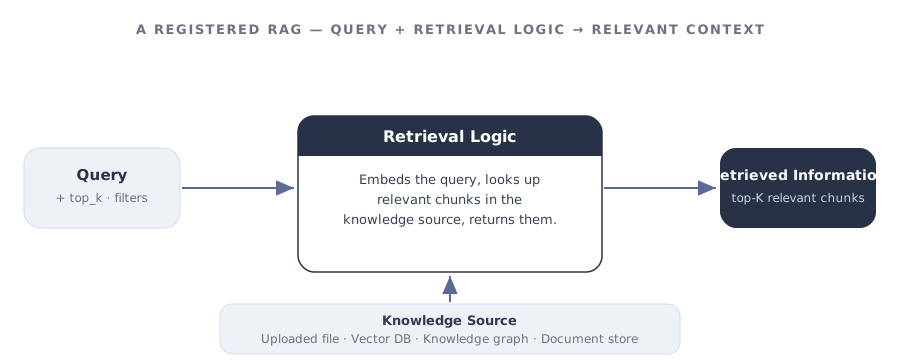
A registered RAG in GGX has two main parts:
- Knowledge Source — a repository of external information: documents, vector databases, knowledge graphs like Neo4j, or other structured/unstructured data sources.
- Retrieval Logic — code that fetches the most relevant information from the knowledge source based on the provided inputs.
A worked example: a card-policy knowledge base
Section titled “A worked example: a card-policy knowledge base”To make this concrete, picture kb — a RAG over a bank’s card-servicing policy documents. It is the same kb that the card-replacement assistant calls whenever a customer asks to replace a lost card. On its own, kb does exactly one job: given a question, return the most relevant policy passages.
- A query arrives — e.g. “How long does a replacement card take?”
- The retrieval logic embeds the query and searches the knowledge source (a vector index built from the policy PDFs).
- It returns the top-K passages — the grounding a downstream pipeline feeds to its model.
Because kb is registered on its own, any pipeline can reuse it — the same knowledge base could ground a card-servicing chatbot, an email-triage tool, or an internal policy-search widget.
Anatomy of a RAG
Section titled “Anatomy of a RAG”| Part | What it holds | Required? |
|---|---|---|
| Retrieval Logic | Code that fetches relevant information from the knowledge source based on the inputs. | required |
| Knowledge Source | A repository of external information — documents, vector databases, knowledge graphs. | Uploaded for Custom; configured via API for API-Based |
| Input Arguments | Typed inputs the retrieval logic operates on. Each has an Alias, Type, optional flag, and default value. | Optional |
| Properties | Description, Group, Permissible Purpose, Approval Workflow. | Mostly required |
| Attributes | Output Type and Alias (the Python variable name pipelines call this RAG by). | required |
The three retrieval types
Section titled “The three retrieval types”Every RAG registered in GGX is one of three types. The choice determines where the knowledge source lives and how the retrieval logic reaches it.
External store Communicates with external knowledge sources like Neo4j or vector databases using APIs to retrieve information from outside environments.
In-platform Lightweight Python logic using various libraries or rule-based retrieval systems.
Uploaded knowledge Leverages uploaded knowledge sources like CSV files or vector indices that GGX hosts as part of the RAG definition.
Adding a RAG to the registry
Section titled “Adding a RAG to the registry”The RAG Registry is the central place where every registered RAG lives, organised into customisable groups. From here you can track, monitor, test, and create new RAGs.
Click Create on the RAG Registry page, then work through the form:
Name, Properties, and Attributes. Give the RAG a clear name and description. Set the Group, Permissible Purpose, and Approval Workflow under Properties, and the Output Type and Alias under Attributes.
-
Input Arguments. Define each argument with its Alias, Type, optional flag, and default value.
-
Resources. Select any registered Models, Global Functions, or Prompts the retrieval logic should be able to call.
-
Input Type. Pick API-Based, Python-Based, or Custom.
-
Knowledge file and Retrieval Logic. Upload the custom knowledge file if required, then write the retrieval code in the Retrieval Logic section.
-
Additional Information. Add notes or attach supporting documentation.
-
Save. Click Save to register. The RAG is saved as a Draft until it goes through approval.
A complete example: the card-policy knowledge base
Section titled “A complete example: the card-policy knowledge base”This fills in every field for kb, the Custom RAG introduced above. It uploads a vector index built from the card-servicing policy documents and returns the passages most relevant to a query.
Page fields for kb
| Field | Value |
|---|---|
| Description | “Retrieves the most relevant passages from the bank’s card-servicing policy documents. Use to ground card-servicing answers; not a source for fraud-dispute rules.” |
| Alias | kb |
| Input Type | Custom |
| Output Type | list[str] |
| Input Arguments | query (str, required), top_k (int, default 3) |
| Resources | embedder (an embedding Model) |
| Knowledge file | card_policy_index — a vector index built from the policy PDFs |
# `query` and `top_k` are Input Arguments defined in Step 2.# `embedder` is a Resource; `card_policy_index` is the uploaded knowledge file.query_vector = embedder.embed(query)  # (1)!hits = card_policy_index.search(query_vector, top_k=top_k)  # (2)!
# Return the passages most relevant to the queryreturn [hit.text for hit in hits] # (3)!embedderis a registered Model added under Resources;queryis provided as an Input Argument.card_policy_indexis the uploaded knowledge file;top_kdefaults to3but the caller can override it.- The return value matches the Output Type
list[str]— exactly what a pipeline receives when it callskb.search(...).
An API-Based RAG reaches an external store — here a Neo4j knowledge graph — instead of an uploaded file:
# `query` is an Input Argument; `graph` is a Resource holding the connection.cypher = build_cypher(query)records = graph.run(cypher, limit=top_k)
return [r["passage"] for r in records]
Testing a RAG
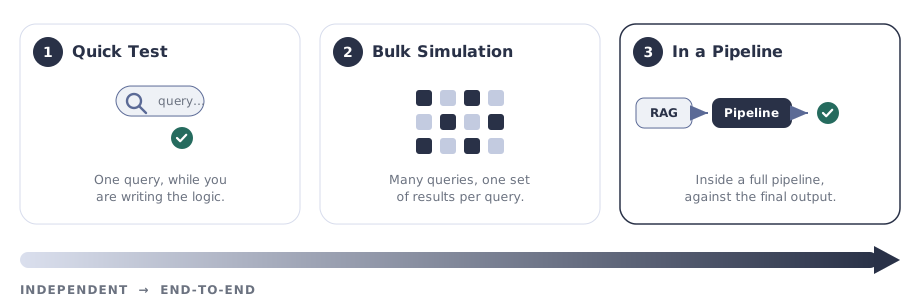
Section titled “Testing a RAG”A RAG is testable on its own — you do not need to wire it into a pipeline first. Validate retrieval quality independently with a Quick Test and a Bulk Simulation, then exercise it end-to-end inside any pipeline that uses it.
Quick Test — independent, while writing the logic
Section titled “Quick Test — independent, while writing the logic”A fast check on a single query without saving; it runs the retrieval logic against sample input so you can confirm it returns sensible passages.
- While creating or editing the RAG, scroll to the Retrieval Logic section.
- Click Test Code in the bottom-right corner of the editor.
- Enter a sample
query(and any other Input Arguments, liketop_k) and confirm the returned chunks are relevant.
Bulk Simulation — independent, at scale
Section titled “Bulk Simulation — independent, at scale”A single query tells you the RAG runs; a bulk simulation tells you how its retrieval behaves across many real questions. It runs an entire dataset of queries through the RAG and records one set of results per query — no pipeline required. Use it to:
- Spot queries that retrieve irrelevant or empty passages a single test would miss.
- Measure retrieval quality across a representative set of questions before approval.
- Attach the run as evidence in the RAG’s approval and risk review.
shared mechanism Bulk Simulation is the same at-scale evaluation used across all registered assets, so the run, its dataset, and its results are logged and comparable just like a pipeline simulation.
In a pipeline — end-to-end
Section titled “In a pipeline — end-to-end”Once the RAG behaves on its own, test it in context. Any pipeline that lists the RAG as a Resource exercises it as part of a full request — so you can see how retrieval quality shapes the final generated output, not just the raw chunks. This is where you confirm kb actually grounds the assistant’s reply, rather than only returning plausible passages.
Capabilities unlocked by registration
Section titled “Capabilities unlocked by registration”Registering a RAG — rather than calling a retriever from a loose script — is what turns it into a governed, reusable asset:
| Capability | What you get |
|---|---|
| Change tracking | Automatic recording of modifications with efficient version upgrades. |
| Purpose enforcement | Automatic detection of Permissible Purpose violations. |
| Testing & evaluation | Evaluate against other RAGs using custom and standardised validation kits. |
| Reusability | Reuse across pipelines, with visibility through Lineage Tracking. |
| API fingerprinting | External retrieval connectivity is fingerprinted so changes upstream are detectable. |
| Auditable path to production | A transparent, fully auditable journey from Draft through Approval to use in pipelines. |
| Executable artifacts | Extract ready-to-productionise artifacts straight from the Registry. |