

Read
View the object, run evaluations, download its documentation and artifacts, and reuse it inside another object.
GGX is built to help teams develop, test, and monitor GenAI pipelines together. Assets from different workstreams live in one central place, so developers, reviewers, and testers can build, iterate, and reuse each other’s work instead of starting from scratch.
Any registered object in Draft or Pending Approval status can be shared with other users — or a user can raise a request for it. Access comes in two levels:
Read
View the object, run evaluations, download its documentation and artifacts, and reuse it inside another object.
Write
Everything Read allows, plus edit, delete, send for approval, and share the object with others.
When requesting access, you choose the scope: the object on its own, or the object together with its lineage — every upstream component it depends on.
| Rule | Detail |
|---|---|
| Eligibility | You can only request access to objects your user role (set in Settings) makes you eligible for. |
| Read can’t re-share | A non-owner with Read only cannot share the object onward. |
| Notifications | When an object is shared, the receiver gets a notification that it is now available to them. |
| Revocable | Shared access can be changed or revoked at any time by the owner or anyone with Write access. |
| Notebook sharing | Access can also be shared from a Jupyter Notebook via the GGX package. |
Role-Based Access Management governs what each user can do. Every onboarded user is assigned a role, configured under Settings → Roles. A role is built from three nested controls — you set how much of the platform a user sees, then exactly what they can do with the objects inside it.
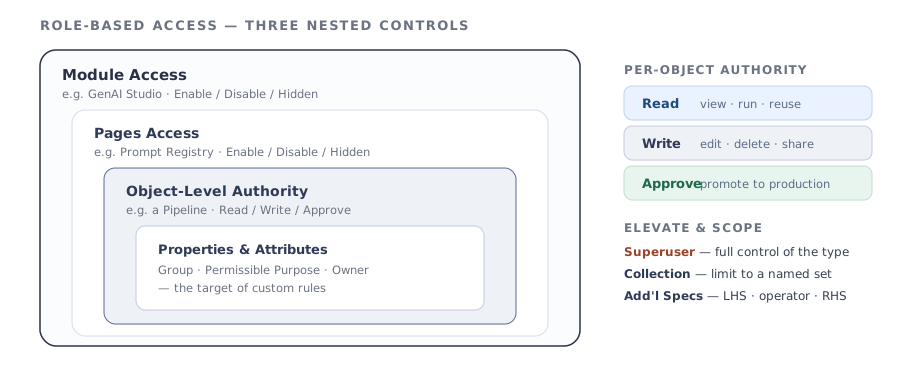
| Control | What you set | Options |
|---|---|---|
| Module Access | Visibility of each module — Data & AI Assets, Human Integrated Testing, Risk & Compliance, Monitor & Track, Settings. | Enable · Disable · Hidden |
| Specific Pages Access | Visibility of each page within an enabled module — Table Registry, Projects, Model Catalog, Prompt Registry, RAG Registry, Pipeline Registry, Global Functions, Reports. | Enable · Disable · Hidden |
| Object-Level Authority | What the role can do with each object type — Data Table, Project, Model, Prompt, and so on. | Read · Write · Approve |
Object-Level Authority can then be elevated and scoped per object type:
A registered object’s definition can be exported, modified outside the platform, and re-synced using GGX commands. GGX automatically tracks and records every external change, keeping the history clear and consistent.
Three mechanisms keep many teams working in the same platform without stepping on each other:
Groups
Classify objects for control and display. Groups are object-type-specific: teams create custom groups visible only to their members, and registries display objects by group so they’re easy to find. Administrators can also use groups to assign access when defining roles.
Workspaces
Create multiple independent workspaces so teams can work in isolation, without visibility into each other’s in-progress work.
Build customized dashboards for key stakeholders and leadership — a bird’s-eye view of activity across teams and across every stage of the application lifecycle, with alerting on the metrics that matter.